
Developer Resources
Jev Model API, Pricing, Docs & GitHub: The Developer Guide
A practical Jev Model guide covering the API endpoint, state and typed questions, current pricing, official docs, GitHub repositories, and a production integration checklist.
Jev Model API, Pricing, Docs & GitHub: The Developer Guide
If you are searching for Jev Model API, pricing, docs, and GitHub in one place, the useful question is not simply “What is this model?” It is: Where does Jev Model fit in a real software system, what does a request look like, what does access cost, and where can a developer verify the implementation?
Jev Model is built around a focused job: turn application state into a typed decision that code can use. Instead of asking a language model to write a paragraph and then trying to infer the next action, you send state, define a small set of questions, and receive structured answers with probability signals. Your application can then route a ticket, prioritize a queue, block a risky tool call, or request human review.
This guide brings the most important developer-facing information together: the Jev Model API mental model, supported state inputs, Choice/Score/Noul question types, an HTTP quickstart, current pricing, the official documentation path, and the public GitHub organization. Pricing and product details change, so the plan summary below is a snapshot checked on September 25, 2026. Always confirm a purchase on the current Jev Model pricing page.
Table of contents
- Jev Model in one minute
- The API mental model: state, questions, result
- Prepare state without overloading the request
- Choose Choice, Score, or Noul
- Call the Jev Model API
- Turn probabilities into safe application logic
- Jev Model pricing: what each plan changes
- Jev Model docs and GitHub: where to verify details
- Production checklist and FAQs
Jev Model in one minute
Jev Model is a decision layer for software. It is a good fit when your application repeatedly needs a bounded answer rather than an open-ended essay. Examples include:
- classifying a support request into billing, technical, account, or other;
- scoring urgency, severity, satisfaction, or operational risk;
- deciding whether a proposed action needs confirmation;
- routing a task to a fast model, a deeper model, or a human;
- selecting which facts should survive a long agent context;
- combining intent, urgency, and review signals before placing work in a queue.
The important distinction is ownership. Jev makes a judgment; your service still owns permissions, business rules, thresholds, tool execution, database writes, and audit logs. A Jev response should be treated as a useful signal, never as a replacement for authorization.
The official Jev Model homepage demonstrates the same pattern with a small incident: provide the context, ask whether it needs a person, and use the returned probability in workflow code. The interface is intentionally close to an ordinary function call, which makes it easier to test one decision before introducing it into a larger agent or backend.
The API mental model: state, questions, result
Think of a request as three layers:
state + model + questions
              ↓
typed answers + probabilities + confidence where supported
              ↓
your routing, queue, guardrail, or review policy
state is the context shared by every question in the request. It can be a simple message, a structured JSON object, or an array of related text items. model identifies the model that evaluates the request. questions is a map of stable IDs to small, typed judgments.
The question ID matters because it becomes the key in the response. For example, if a request contains department, urgency, and needs_human, the service can read those same keys without relying on the order of a generated paragraph. This is one of the main reasons to use a decision API instead of parsing free-form text.
The Jev Model developer docs currently describe three core question types and show that multiple questions can be evaluated against one state. That means one support ticket can be classified, scored, and checked for human review in the same request. It also means you should resist the temptation to create one giant question that asks for every business decision at once. Smaller questions are easier to label, test, version, and change.
Prepare state without overloading the request
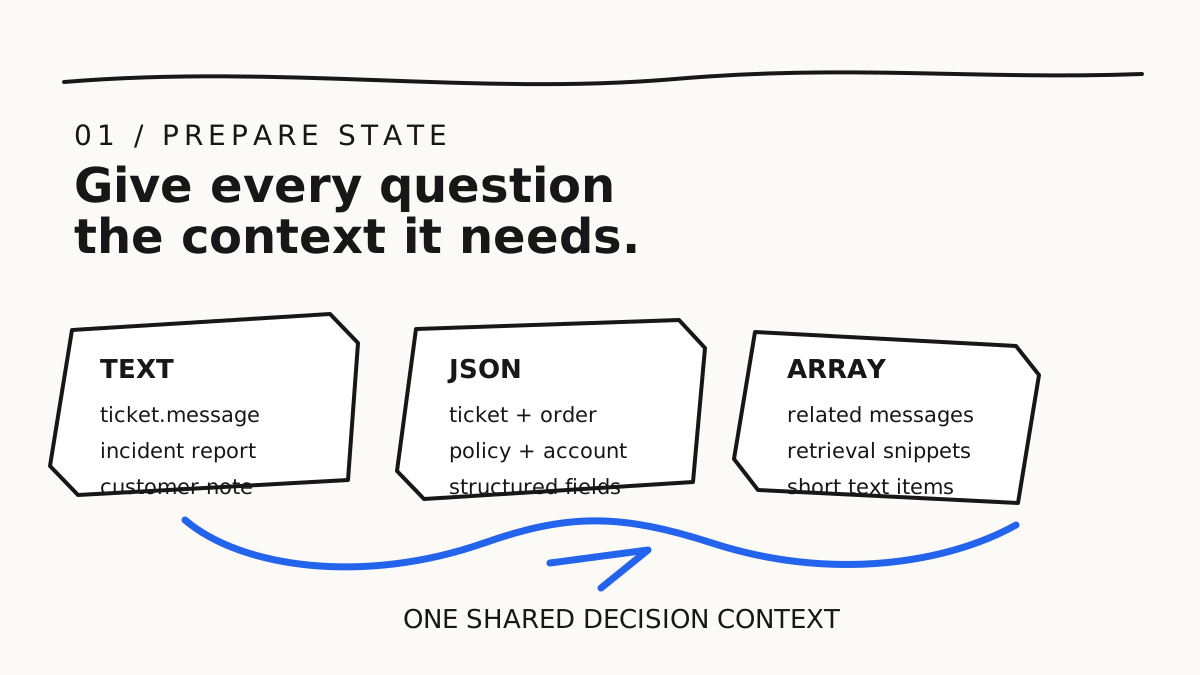
The best state is not the largest state. Send the facts needed for the decision and remove secrets, irrelevant history, and personal data that will not change the answer.
Text state
Use a string when the decision is about one message, ticket, alert, or short report:
{
  "state": "Three deploys have failed and production is returning 500s."
}
Text is convenient for a first experiment, but it can hide important fields. If the workflow depends on plan, region, policy, or account status, make those facts explicit instead of burying them in prose.
JSON object state
Use an object when several fields jointly affect the decision:
{
  "state": {
    "ticket": {
      "text": "The payout has failed three times.",
      "channel": "email"
    },
    "customer": {
      "plan": "pro",
      "days_open": 3
    },
    "policy": {
      "same_day_escalation": true
    }
  }
}
Objects are especially useful for routing and safety checks because the question can refer to named fields. They also make logs and test cases more legible. Do not treat a structured object as permission to send your entire database row. Minimize the payload and redact tokens, passwords, payment details, and other values that the judgment does not need.
Array state
An array of text is useful for related messages, retrieval snippets, conversation turns, or short notes. Keep each item focused. Unrelated documents make it harder to know why a result changed and can increase the risk of an accidental match.
At the current documentation boundary, Jev Model accepts text, JSON objects, and arrays of text as state. Images, audio, and video are not direct state inputs. If your workflow starts with those media types, use OCR, transcription, or another preprocessing step and then evaluate the resulting text or structured fields.
Choose Choice, Score, or Noul
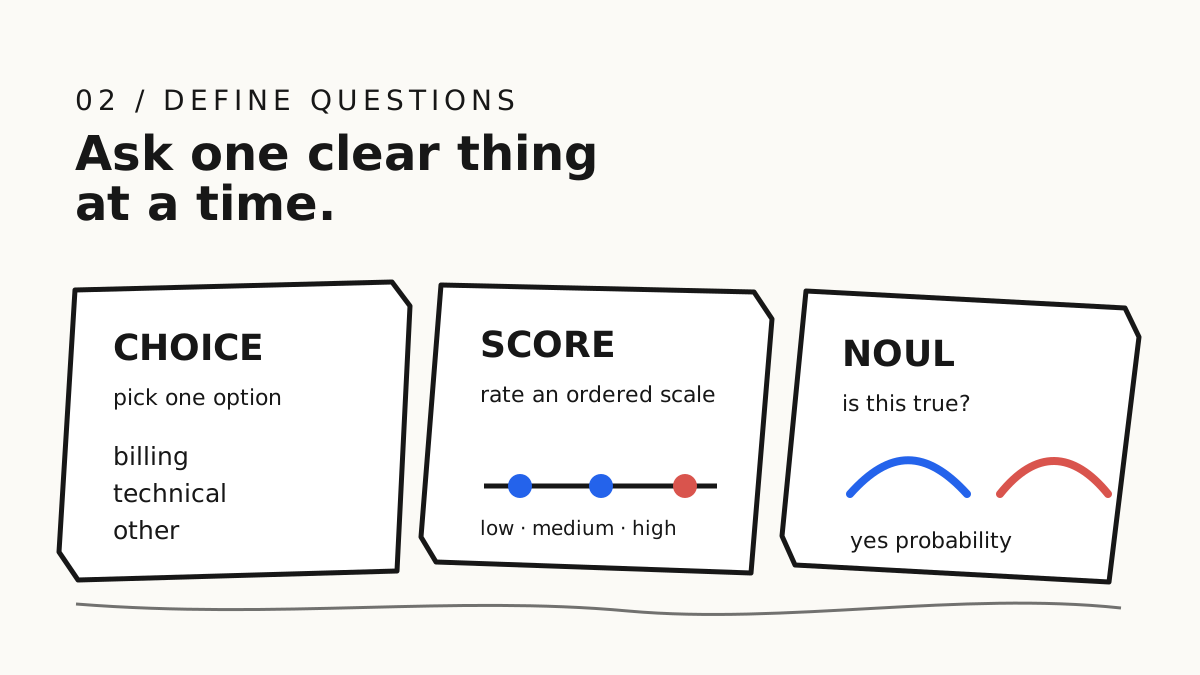
The question type should match the shape of the answer, not the way the question sounds in a chat prompt.
| Type | Use it for | Typical result | Example |
|---|---|---|---|
choice |
Classification or routing from a known set | Selected option, probabilities, confidence | Which team owns this ticket? |
score |
An ordered business rubric | Weighted score, legend, probabilities, confidence | How severe is the incident? |
noul |
A yes-or-no judgment | Probability that the answer is yes | Does this action need a person? |
Choice: define the answer space
Use Choice when the application can list the outcomes in advance. Good criteria are mutually understandable and tied to actions. For a support router, billing, technical, account, and other are more useful than vague labels such as type_a and type_b. Include an other, unknown, or review path when the real world can exceed your list.
Score: make levels operational
Use Score for an ordered scale such as low, medium, and high risk. The levels should say what each level means and what the application will do with it. “Low / medium / high” without definitions is not a rubric; it is an invitation for inconsistent labeling. Jev can return a probability-weighted score between named levels, which is useful when a queue needs a ranking rather than only a bucket.
Noul: ask one true-or-false question
Use Noul for a single yes-or-no judgment: “Does the user explicitly request a refund?” or “Does this tool call require human confirmation?” The noul value represents the probability that the answer is yes. It is not a second generic confidence field. Your service should choose a threshold based on the cost of a false positive and false negative.
Call the Jev Model API
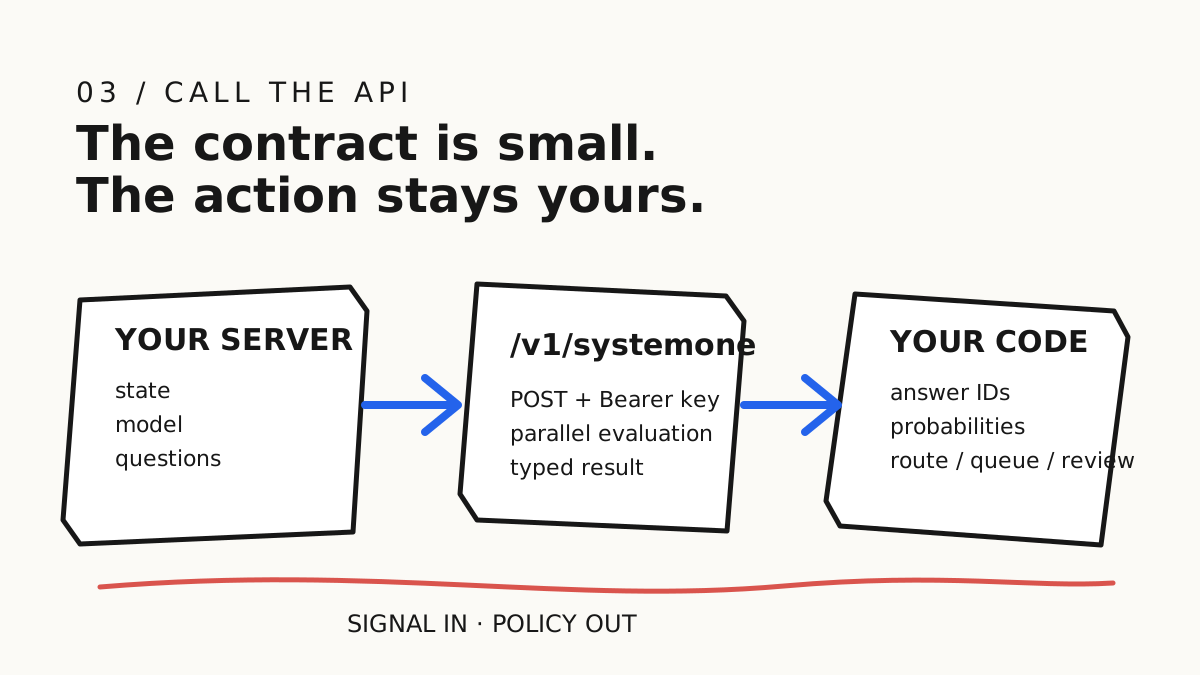
The current website documents a REST-ready endpoint:
POST https://jevmodel.net/v1/systemone
Authorization: Bearer <API_KEY>
Content-Type: application/json
The minimum request has state, model, and questions. A practical multi-question example looks like this:
curl -X POST https://jevmodel.net/v1/systemone \
  -H "Authorization: Bearer $JEV_API_KEY" \
  -H "Content-Type: application/json" \
  -d '{
    "model": "jev-latest",
    "state": {
      "ticket": "The customer has tried to connect Stripe for three days.",
      "plan": "pro"
    },
    "questions": {
      "department": {
        "type": "choice",
        "instructions": "Which team should handle this ticket?",
        "criteria": {
          "billing": "Payments, invoices, and refunds",
          "technical": "Bugs, outages, and integrations",
          "account": "Login, identity, and account settings",
          "other": "No listed team is a safe match"
        }
      },
      "urgency": {
        "type": "score",
        "instructions": "How urgent is this ticket for the support queue?",
        "criteria": ["Routine", "Important", "Time-sensitive"]
      },
      "needs_human": {
        "type": "noul",
        "instructions": "Does this ticket require human review before action?"
      }
    }
  }'
There is a small versioning detail worth checking. The current API reference recommends the jev-latest model name, while the Playground and some public examples may show a versioned identifier such as typesafe/jev-1.13. Do not hard-code a model ID from an old blog post without checking the live docs and the request preview in the Playground. Pin a version when reproducibility is more important than automatic upgrades, and document the choice in your service configuration.
Keep the API key in a server-side secret manager or environment variable. Never place it in browser JavaScript, a public Markdown snippet with a real value, client-side logs, or a committed .env file. Add timeouts, non-2xx handling, request-size limits, and a retry policy before you call the endpoint from a production worker.
Turn probabilities into safe application logic
A structured answer is not the same thing as a finished workflow. Your service still needs to validate the response, apply policy, and decide what happens when the model is uncertain.
A conceptual response might look like this:
{
  "model": "jev-1.13.0",
  "answers": {
    "department": {
      "type": "choice",
      "choice": "technical",
      "probabilities": {
        "billing": 0.08,
        "technical": 0.84,
        "account": 0.05,
        "other": 0.03
      },
      "confidence": 0.75
    },
    "urgency": {
      "type": "score",
      "score": 1.7,
      "confidence": 0.78
    },
    "needs_human": {
      "type": "noul",
      "noul": 0.86
    }
  }
}
Treat the numbers as signals. A low-risk ticket router might auto-route at a lower threshold than a payment, deletion, permission, or account-change workflow. For a high-impact action, combine the Jev signal with deterministic authorization and a human confirmation step. A good fallback is explicit: unknown choice goes to review, low confidence goes to a queue, a timeout uses a safe default, and a malformed response fails closed.
Log enough to reproduce the decision without logging secrets: model ID, question IDs, question version, a redacted state summary, returned probabilities, threshold, final action, and whether a person intervened. Test against historical examples and counterexamples. When policy or product behavior changes, update the question definitions and recalibrate thresholds instead of silently trusting yesterday’s boundary.
Jev Model pricing: what each plan changes

The current Jev Model pricing page presents one-time access plans with unlimited usage during the access period. The following is a point-in-time summary, not a promise that future pricing or availability will remain unchanged.
| Plan | Current price | Access period | Capacity and notable features |
|---|---|---|---|
| Starter | $9.9 | 7 days | 1 workspace, 1 concurrent request, standard speed, Choice/Score/Noul, Playground, API key management, email support |
| Pro | $99 | 30 days | Unlimited workspaces, 3 concurrent requests, fast lane, parallel questions, API access, usage history, priority support |
| Enterprise | $999 | 365 days | 10 concurrent requests, dedicated fast lane, team collaboration, custom integration support, security guidance, dedicated and priority support |
All three plans include the core typed-decision concepts. The practical difference is how much workflow capacity and support your team needs. Starter is suited to validating one real decision. Pro is the more natural fit for a product with several workspaces or concurrent production requests. Enterprise is aimed at longer access, collaboration, custom integration, and higher concurrency.
The homepage also offers a free online Playground experience. Use it to test a low-risk example and inspect the request shape before buying access for a backend integration. Check the live page immediately before purchase because plan duration, pricing, limits, and included support are commercial details that can change.
Jev Model docs and GitHub: where to verify details
Use the official Jev Model docs as the source of truth for request fields, question criteria, response shapes, error handling, and retry behavior. Use the online Playground as a discovery tool: create a small question, run it against representative state, and inspect the JSON preview before writing a client.
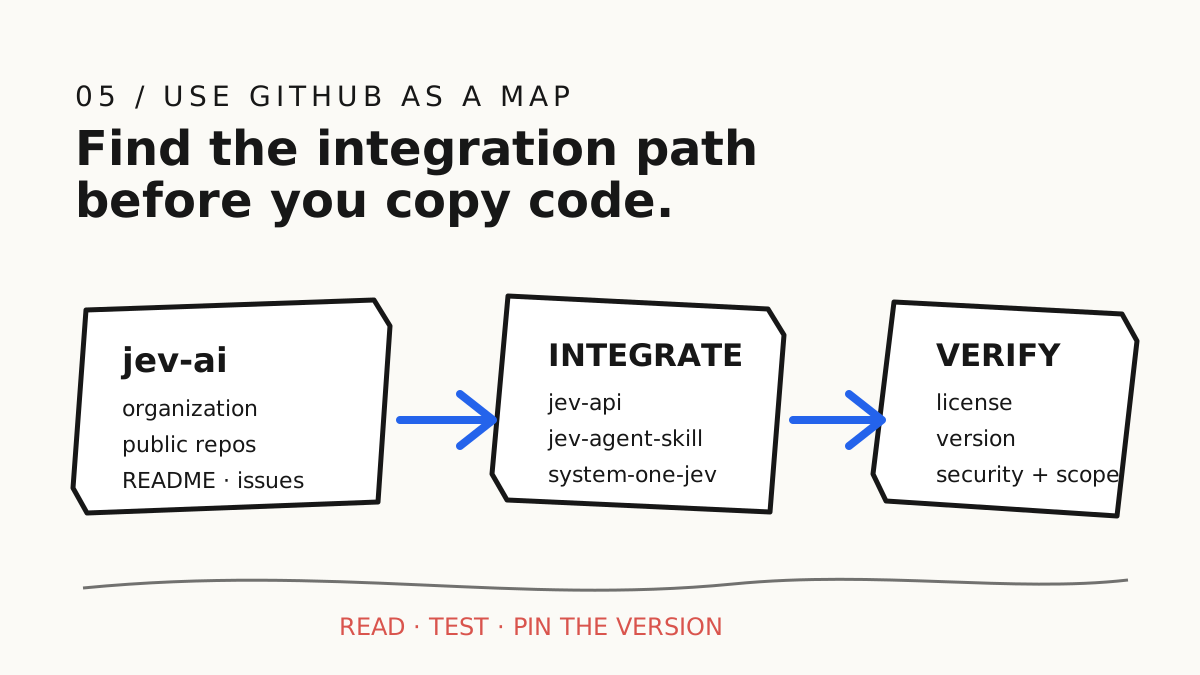
The public Jev AI GitHub organization is useful for discovering implementation context and integration projects. Its public repository list currently includes names such as:
jev-api, for API-related code or examples;jev-agent-skill, for using bounded Jev decisions inside compatible coding agents;system-one-jev, for the System One model project;jev-ai-model,typesafe-ai, and related model or integration repositories.
Treat GitHub as a map, not as a substitute for the live docs. Before copying code, inspect the repository README, commit activity, license, issue status, supported runtime, authentication assumptions, and the model version it references. Public repositories can be experimental, archived, or ahead of the hosted API. A repository name is not a guarantee that its endpoint or SDK fields are current.
Production checklist and FAQs
A practical launch checklist
- Start with one low-risk decision whose correct answer can be measured.
- Keep the state minimal and remove secrets or unnecessary personal data.
- Give every question a stable ID and one clear purpose.
- Add
other,unknown, or human review where the answer space can be incomplete. - Keep the API key server-side and rotate it through your secret manager.
- Validate status codes, response shape, timeouts, retries, and duplicate requests.
- Set thresholds from false-positive and false-negative costs, not from a convenient round number.
- Keep authorization, deterministic rules, and final actions in your own service.
- Record model version, question version, probabilities, and downstream action.
- Recheck the docs and Jev Model pricing before every production rollout or purchase.
Is Jev Model a chat API?
No. It can sit inside a chat or agent workflow, but its primary output is a structured decision. Use a generative LLM when you need a long explanation, draft, or open-ended conversation; use Jev when the application needs a bounded signal that code can consume.
Can one API request contain several questions?
Yes. Multiple questions share the same state and are evaluated in one request. Keep them independent: department, urgency, and human-review need are better as three questions than as one compound instruction.
Is Noul the same as confidence?
No. Noul is the probability that a yes-or-no statement is true. Choice and Score can return confidence derived from their probability distributions. Use the current response schema and choose thresholds according to the risk of the next action.
Should I start with Starter, Pro, or Enterprise?
Choose based on validation scope, concurrency, workspaces, and support requirements. Starter is a short validation window; Pro is designed for a production product with more capacity; Enterprise is for a longer access period and team or custom integration needs. Confirm the current commercial terms on the live pricing page.
Conclusion
The simplest way to understand Jev Model is to follow the path from state to typed questions to application action. The API gives your service a small, inspectable contract. The docs explain the current schema. Pricing tells you what access and capacity are available. GitHub helps you discover surrounding tools and agent integrations, but the hosted docs remain the safest place to verify the live API.
If you are evaluating Jev for a real product, run one low-risk case in the Playground, export the request shape, integrate it behind a server-side API key, and measure the result against historical examples. Once the boundary is clear, Jev Model can become a practical decision component inside routing, queues, agent guardrails, and human-review workflows.
Research date: 2026-09-25
Primary sources: Jev Model homepage, Jev Model docs, Jev Model Playground, Jev Model pricing, Jev AI GitHub organization, and the related Jev AI API tutorial.