
Developer Resources
What Is the Jev AI Model? A Practical Guide to Typed AI Decisions
A practical guide to the Jev AI model: how System One decisions use state, Choice, Score, and Noul questions, where Jev fits beside LLMs, and how to build safer production workflows.

What Is the Jev AI Model? A Practical Guide to Typed AI Decisions
If you are searching for the Jev AI model, the most useful starting point is to stop thinking of it as another chatbot. Jev is designed for a narrower but important job: turn a piece of application state into a structured decision that software can use.
You provide the context a workflow already has, define the questions that matter, and receive typed answers with probability signals. Your code can then route a support ticket, score an event, choose a model, pause a risky tool call, or ask a person to review the case. The official Jev AI model overview describes this direction as a System One model for software.
That distinction matters because many products use general-purpose language models for small decisions hidden inside a larger workflow. They ask an LLM to classify a message, return JSON, or say whether an action looks safe. The model may do the job, but the application still has to parse free-form output, handle schema drift, and decide what a vague confidence statement means. Jev puts the answer boundary in the question itself.
This guide explains what the Jev AI model is, how it works, when to use it, how it relates to generative LLMs, and what to verify before connecting it to production code.
Table of contents
- What the Jev AI model is
- How a Jev decision works
- State is the evidence, not a prompt dump
- How to design better question contracts
- Choice, Score, and Noul
- Why typed decisions help software
- Jev AI model vs. a traditional LLM
- Practical use cases
- A production integration pattern
- Limitations and evaluation
- FAQ
What the Jev AI model is
The Jev AI model is a decision layer for software. Its input is a shared state plus one or more typed questions. Its output is a structured answer for each question, with probability information and, for Choice and Score, confidence information.
The model is useful when the answer space can be described before the request runs. For example, a help-desk application may need to answer:
- Which approved team should own this ticket?
- How severe is the incident on a defined scale?
- Does this request need a person before any tool runs?
- Should this task go to a fast model or a deeper reasoning model?
Those are not necessarily writing problems. They are decision contracts. When the contract is clear, the application can keep the final action in ordinary code.
Jev does not replace deterministic business rules, access control, or human responsibility. A result that says “billing” should not automatically grant a refund. A high “needs review” probability should send the case to the review path that your product defines. The model supplies a judgment signal; your system remains responsible for authorization and execution.
The Jev AI Playground is a useful first test because it lets you bring a real example, define questions, and inspect the shape of the result before writing an integration. Start with one low-risk decision rather than trying to model an entire business process at once.
How a Jev decision works
A Jev request has three conceptual parts:
- State — the message, record, event, or structured context to evaluate.
- Questions — the bounded judgments your application needs.
- Answers — values that preserve the question type and can be consumed by code.
The same state can support several questions in one request. A support ticket might be evaluated for department, urgency, sentiment, and human-review need at the same time. This is different from making the model write a long analysis and asking a parser to recover several decisions from the text.

The flow can be represented simply:
state + questions
        ↓
typed answers + probabilities
        ↓
application policy
        ↓
route, queue, block, continue, or review
The Jev developer documentation describes the request and response contract in more detail. The important architectural idea is that the model is one component inside the loop, not the owner of the loop.
A minimal request shape
The official API documentation uses a JSON body with state, model, and questions. A minimal server-side request can look like this:
{
  "model": "jev-latest",
  "state": "Three deploys failed and production is returning 500s.",
  "questions": {
    "needs_human": {
      "type": "noul",
      "instructions": "Does this incident need immediate human attention?"
    }
  }
}
The response keeps the question ID and returns a typed answer:
{
  "model": "jev-1.13.0",
  "answers": {
    "needs_human": {
      "type": "noul",
      "noul": 0.94
    }
  },
  "usage": {
    "input_tokens": 296,
    "output_tokens": 20
  }
}
The exact model name and endpoint should be checked against the current workspace documentation. The general contract is stable and easy to reason about: send the smallest useful state, ask a bounded question, then let application code interpret the signal.
State is the evidence, not a prompt dump
State is the information every question reads. According to the current documentation, the Jev AI model accepts three practical input shapes:
- Text for a message, ticket, email, short document, or event description.
- A JSON object for named fields such as account age, order value, policy, and requested action.
- An array of text when the evidence is naturally split across messages, notes, or document fragments.
Good state is relevant, inspectable, and small enough to audit. If a routing decision depends on a ticket message, customer plan, and outage status, send those fields explicitly. If it does not depend on a marketing note from six months ago, leave that note out.
This discipline improves more than model quality. It makes a decision easier to replay, log, and evaluate. It also reduces accidental coupling between unrelated facts. A useful state builder might normalize a ticket before the model sees it:
{
  "ticket": {
    "message": "I was charged twice for my annual plan.",
    "account_age_days": 420,
    "recent_failures": 0
  },
  "policy": {
    "refund_requires_review": true
  },
  "proposed_action": "refund_one_charge"
}
The current input boundary is also important: text, objects, and text arrays are supported; native image, audio, and video inputs are not supported yet. If a workflow starts with a screenshot or recording, convert the relevant evidence into a text or structured representation first, or use a model built for that modality.
How to design better question contracts
The quality of a typed answer depends heavily on the contract around it. A useful question has one decision target, a clear subject, and criteria that do not overlap. “Is this good?” is too broad for a production branch. “Should this support request enter the priority queue under our published SLA?” gives the model and the application a shared boundary.
Use the following design rules:
- Ask one decision per question. Split department, urgency, and approval into separate IDs so each signal can be evaluated and monitored.
- Describe the evidence that matters. If the answer depends on a policy, plan level, or time window, make that field explicit in state or structured instructions.
- Define criteria symmetrically. Explain what distinguishes adjacent Choice options or Score levels, rather than writing a detailed description for only one outcome.
- Make the downstream action visible to the team, not to the model as hidden authority. A question can judge whether review is needed; code still decides what review means.
- Version the contract. Store a question version with the result so a later change to wording does not make historical decisions impossible to interpret.
Before adding more questions, test whether the answer changes when one relevant fact changes and stays stable when irrelevant wording changes. This kind of paired test catches overlapping criteria and accidental dependence on formatting. It also produces a better evaluation set than collecting only easy examples.
Choice, Score, and Noul
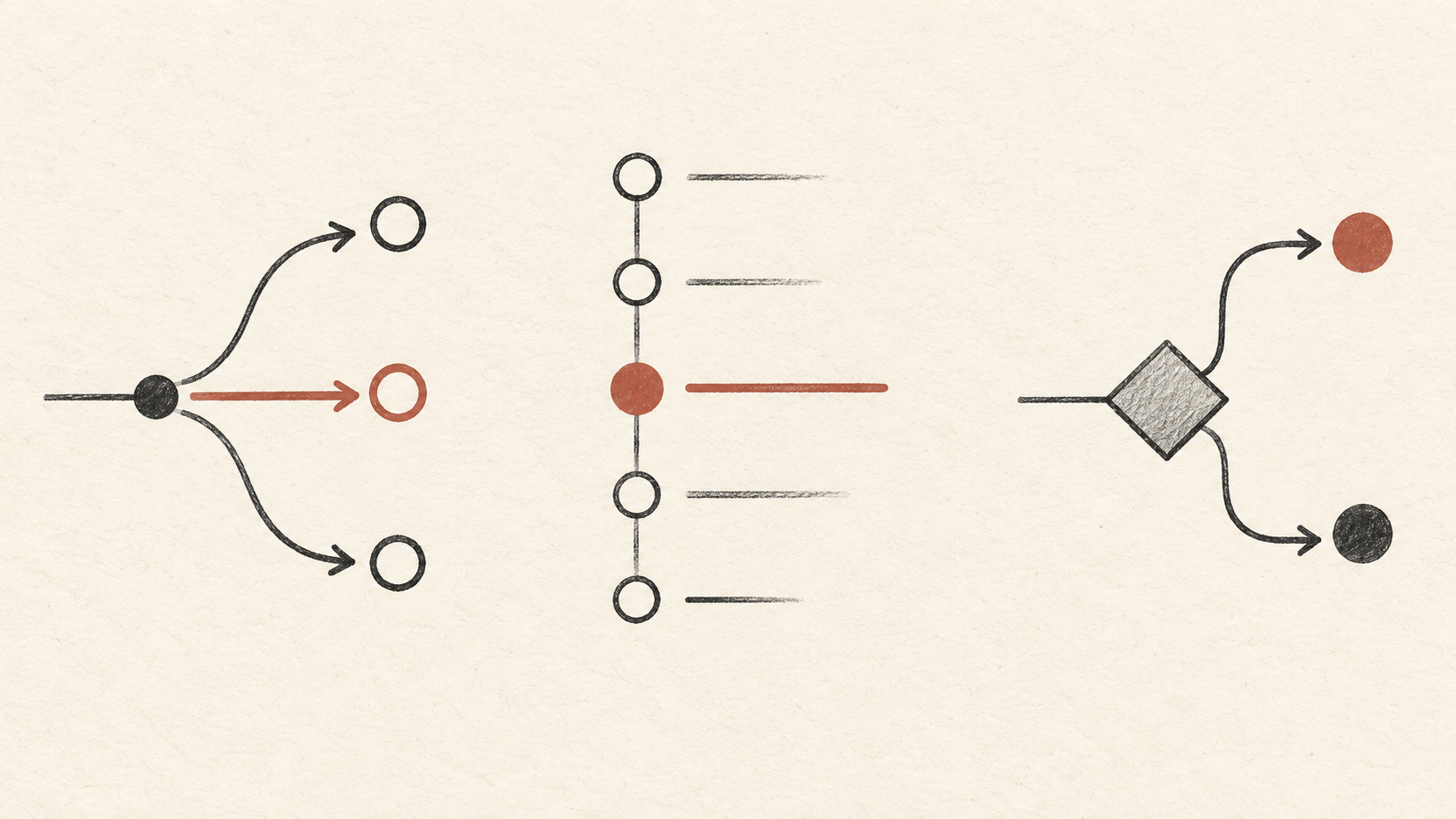
The Jev AI model has three core question types. Choose the type that matches the shape of the decision instead of forcing every task into a yes-or-no prompt.
Choice: select one known option
Use Choice when the result must be one item from a defined set. It fits classification and routing:
{
  "department": {
    "type": "choice",
    "instructions": "Which team should handle this request?",
    "criteria": {
      "billing": "Payments, invoices, refunds",
      "technical": "Bugs, outages, integrations",
      "account": "Login, profile, account access"
    }
  }
}
Choice returns the selected option, probabilities for the available options, and a confidence signal. The criteria are part of the contract, so your application knows which values are valid before a response arrives.
Score: place state on an ordered rubric
Use Score when the answer belongs on a spectrum, such as severity, frustration, or review risk:
{
  "severity": {
    "type": "score",
    "instructions": "How severe is this incident for production users?",
    "criteria": [
      "Minor inconvenience",
      "Degraded experience",
      "Major outage"
    ]
  }
}
Score uses an ordered low-to-high list. Its probability-weighted result can fall between levels, which is useful when an application needs a continuous threshold rather than only a label.
Noul: judge a bounded proposition
Use Noul for a yes-or-no style judgment:
{
  "needs_confirmation": {
    "type": "noul",
    "instructions": "Does this proposed action require human confirmation?",
    "criteria": {
      "true": "The action is destructive, costly, or difficult to reverse",
      "false": "The action is low risk and reversible"
    }
  }
}
Noul is a number from 0 to 1 representing the probability that the answer is yes. It is not a guarantee and it is not a permission system. Treat it as a signal that should be combined with hard rules, user intent, and the risk of the action.
Use several types together
The value of the primitives becomes clearer when they share one state. A single request could use Choice to select a queue, Score to estimate severity, and Noul to decide whether review is needed. The visual below represents that fan-out.
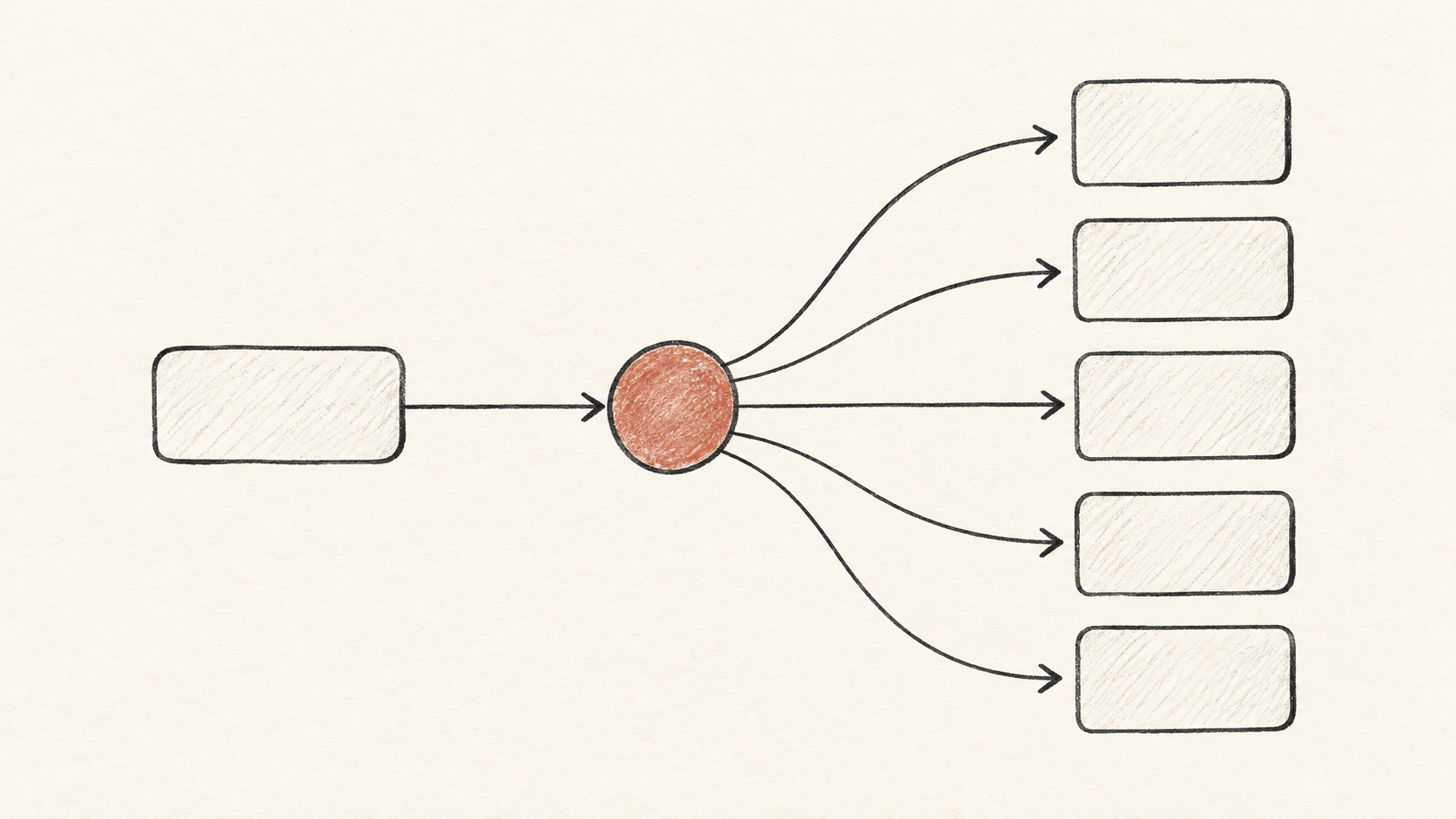
This can remove avoidable round trips. It also makes the decision surface explicit: each question has a name, a type, and a criterion that can be tested independently.
Why typed decisions help software
The main benefit is not that Jev produces shorter output. The benefit is that the output is designed to be used by a program.
Less parsing work
A generated paragraph can contain the right answer, but a service still needs to extract it. Even JSON from a generative model may have missing keys, unexpected strings, or explanations where a value was expected. A typed Jev answer gives the application a smaller validation surface.
A visible answer boundary
Choice criteria and Score levels make the allowed result space inspectable. Reviewers can see which routes exist and whether the descriptions overlap. That is more maintainable than one large prompt that quietly contains routing policy, tone instructions, and edge-case behavior.
Parallel questions over shared evidence
When several signals depend on the same state, asking them together can make the workflow simpler. You do not need to create a separate conversation just to get department, urgency, and review status.
An uncertainty signal
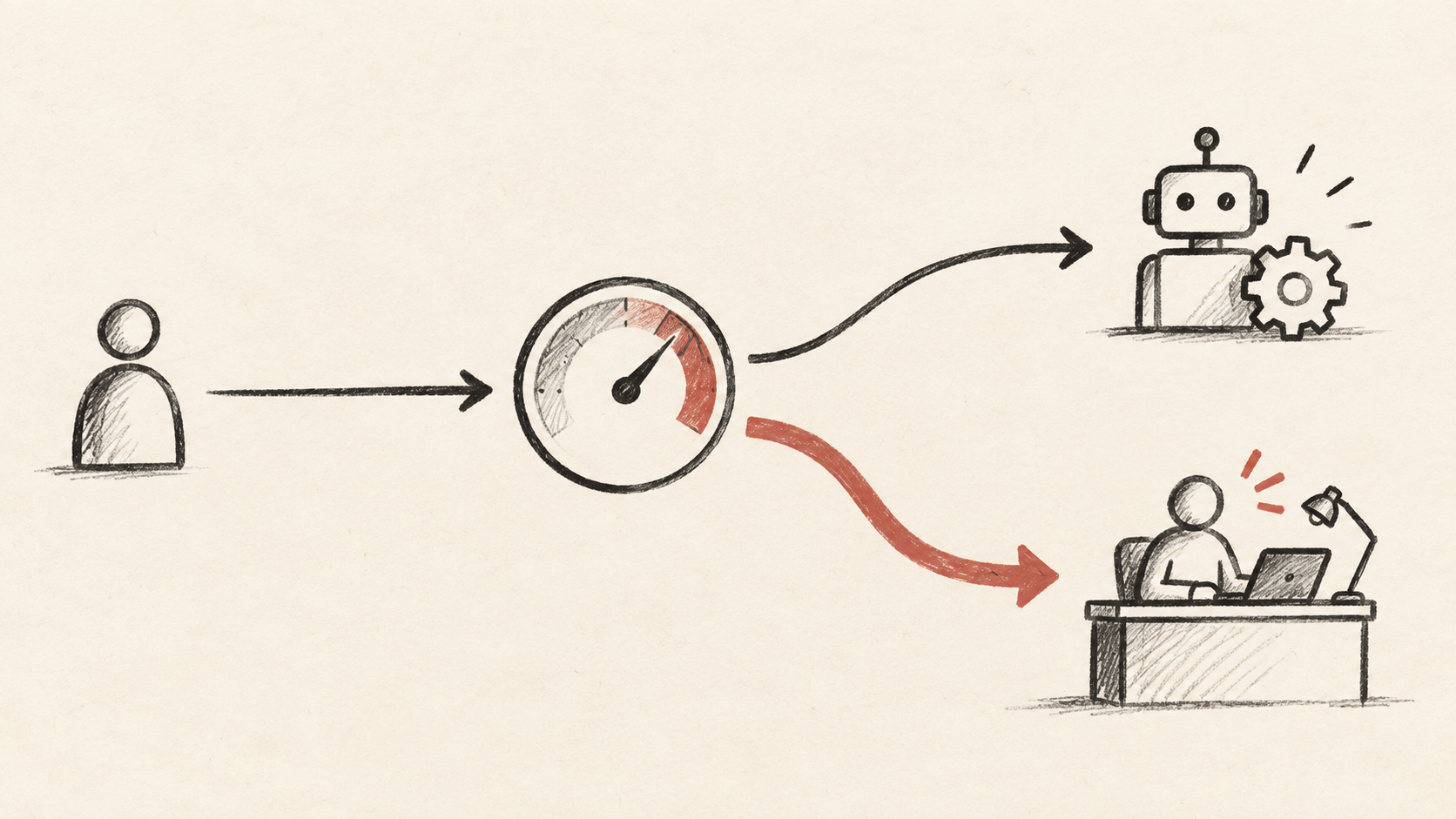
Probabilities and confidence can help you choose between automation and review. A low-confidence classification may enter a manual queue; a high-confidence classification may continue, subject to policy. The threshold belongs to your product, not to the model by default.
Jev AI model vs. a traditional LLM
Jev and a generative LLM solve different problems. A traditional LLM is usually the better tool when the output itself is language: an explanation, a draft, a summary, code, or an open-ended plan. Jev is a better fit when the output is a bounded judgment that another part of the system should consume.
The practical difference looks like this:
| Need | Better fit |
|---|---|
| Write an email or explain a diagnosis | Generative LLM |
| Classify a support request into approved queues | Jev Choice |
| Score severity on a known rubric | Jev Score |
| Decide whether a tool call needs review | Jev Noul |
| Plan a multi-step task in natural language | Generative LLM plus deterministic code |
| Route a request before choosing an expensive model | Jev plus an allowlisted router |
The Jev AI vs. LLM guide expands on this division of labor. In many real systems, the best architecture is not “Jev or LLM.” It is “Jev for the small control decisions, an LLM for language and composition, and code for permissions and execution.”
Practical use cases
Support triage
Send the ticket text and account context as state. Ask for department, urgency, and whether a person should intervene. Route only to teams in your allowlist. If the model is uncertain or the policy marks the case as sensitive, place it in a review queue.
Model routing
Before spending tokens on a powerful reasoning model, ask whether the task is simple, complex, or unsuitable for automation. Use Choice to select from approved model IDs. Use a separate Noul question to identify cases that need escalation. The router should never be allowed to invent an arbitrary provider or model name.
Tool-call guardrails
A coding or operations agent can propose a tool call as structured state: tool name, arguments, user request, permission context, and reversibility. Ask Noul whether approval is required. Then run deterministic validation and permission checks. The Jev result can pause the call, but it must not be the only gate for deletion, payment, or access changes.
Content and lead classification
Choice can place an inbound lead or content item into a known category. Score can estimate fit or risk on a rubric. Keep the rubric stable long enough to compare results, and store the raw state, question version, answer, and downstream action for later evaluation.
Context compaction
In a long-running agent, ask which facts still matter for the next task. Preserve source IDs, permissions, and constraints even when a fact appears low priority. Jev can help produce a bounded relevance or risk signal; code should still define what cannot be discarded.
A production integration pattern
A reliable Jev integration separates five responsibilities:
- State builder — selects and normalizes the evidence.
- Question contract — versioned Choice, Score, and Noul definitions.
- Jev client — server-side authentication, timeout, retry, and response validation.
- Policy layer — thresholds, allowlists, permissions, and human-review rules.
- Action and audit — executes the approved result and stores enough context to reproduce it.

Keep the API key on the server. Do not expose it in browser JavaScript, client bundles, public prompts, or logs. The client should call your backend, and your backend should call the Jev endpoint.
A simplified control flow could be:
event
  ↓
build minimal state
  ↓
evaluate typed questions
  ↓
validate answer shape
  ↓
apply policy and thresholds
  ├─ continue automatically
  ├─ queue for a person
  └─ block or ask for confirmation
  ↓
write an audit record
For transient 429 or 529 responses, use exponential backoff and a bounded retry count. For validation errors, fix the request instead of retrying unchanged. For high-impact actions, fail closed: if the decision service is unavailable, do not silently execute a destructive fallback.
Limitations and evaluation
The Jev AI model is not a universal reasoning engine. It is strongest when the answer space is clear, the state contains the evidence, and the application knows what should happen after each result.
Before production, build a small evaluation set from real or safely anonymized examples. Include ordinary cases, ambiguous cases, adversarial wording, missing fields, and examples near your threshold. Track at least:
- accuracy for each Choice or Noul question;
- calibration between probability and observed outcomes;
- false positives and false negatives for safety gates;
- review volume created by your threshold;
- latency, error rate, and retry behavior;
- changes after updating state or criteria.
Do not treat confidence as accuracy. A confident mistake is still a mistake. Re-run the evaluation set when you change a question description, add a criterion, change the state builder, or move to a new model version.
The Jev pricing page is the right place to confirm current access and usage details. Product limits and plan terms can change, so keep commercial assumptions out of hard-coded safety policy.
FAQ
Is the Jev AI model a replacement for ChatGPT or another LLM?
No. Jev is for bounded decisions inside software. Use a generative LLM for writing, explanation, code, and open-ended reasoning. Combine the two when your workflow needs both judgment and language.
Does Jev return free-form explanations?
The core contract is typed answers, not a generated paragraph. If a user needs an explanation, keep the decision and the explanation as separate steps: use Jev for the bounded signal and a suitable model or deterministic template for the human-facing message.
Can Jev authorize a refund or delete a record?
No. It can assess whether a request appears to require review, but your permission system, deterministic policy, confirmation flow, and audit trail must control the action.
What should I try first?
Choose one low-risk, well-scoped decision with a clear answer set. Test it in the Jev AI Playground, compare results on representative examples, then move the request behind your server and add thresholds and review paths.
What is the shortest useful definition?
The Jev AI model turns shared state and typed questions into probability-backed decisions that application code can route, score, block, or review.